Tuesday, October 15, 2019

Liferay DXP Patching Tool

This Blog will help you to apply the Liferay Patch to Liferay Enterprise users. As we know that Liferay provides patching-tool utility to update the latest fix pack. Liferay Enterprise users by default they will have a Patching tool in the server. If it is not available then we can download from the Liferay Website. 
  1.  Download and Configure Patching Tool.
  • Download patching from Liferay Website.
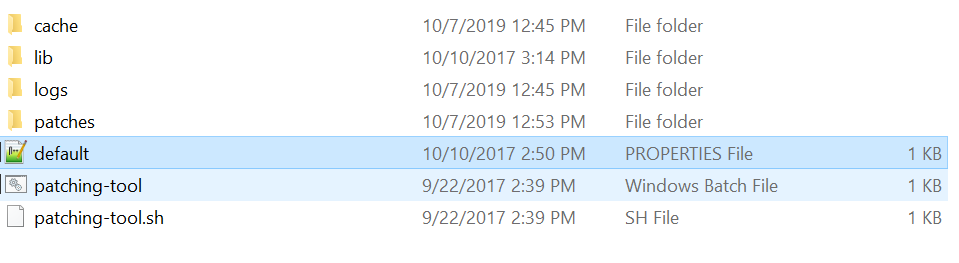
  • Below is the folder structure inside the patching tool 
  • Change the below details in default.properties files.
            patching.mode=binary
               war.path=../tomcat-8.0.32/webapps/ROOT/
                 global.lib.path=../tomcat-8.0.32/lib/ext/
                    liferay.home=../
        • Inside the patches folder we need to copy the Patch file zip. Below i have two versions copied into my local pathches folder below is the screenshot.
        • After copying the Patching file Open the patching tool (liferay-dxp-digital-enterprise-7.0-sp6\patching-tool\) path in command prompt. 
        • In the above path, we have the files "patching-tool.bat" - for windows system and "patching-tool.sh"- for Linux or ubuntu system.
        • Below are the few commands which are available.
                   patching-tool info - This command is used to display the information about the patch available in your Liferay server and the version of the patching tool.
                     patching-tool auto-discovery - This command is used to auto-discover the Liferay Server based on your default.properties file.
                       patching-tool setup - This command is used to setup the patching.
                       patching-tool install- This command is used to install the patching.
            • First run "patching-tool setup" or   "./patching-tool.sh setup" for the setup of patch.
            • Then run "patching-tool install" or   "./patching-tool.sh install" to install the patch.
            • After installing the patch we can check the version of the patch by using the "patching-tool info" command.

            Thursday, August 8, 2019

            Retrieve field Value from Custom Document Type of Liferay

            The below code helps you to get the field values from the custom document type of Liferay.

            import com.liferay.portlet.documentlibrary.model.DLFileEntry;
            import com.liferay.portlet.documentlibrary.model.DLFileEntryMetadata;
            import com.liferay.portlet.documentlibrary.model.DLFileEntryType;
            import com.liferay.portlet.documentlibrary.model.DLFileVersion;
            import com.liferay.portlet.documentlibrary.model.DLFolder;
            import com.liferay.portlet.documentlibrary.model.DLFolderConstants;
            import com.liferay.portlet.documentlibrary.model.DLFileEntry;
            import com.liferay.portlet.documentlibrary.model.DLFileEntryMetadata;
            import com.liferay.portlet.documentlibrary.model.DLFileEntryType;
            import com.liferay.portlet.documentlibrary.model.DLFileVersion;
            import com.liferay.portlet.documentlibrary.model.DLFolder;
            import com.liferay.portlet.documentlibrary.model.DLFolderConstants;

                public static String getFieldValue(DLFileEntry fileEntry,String name){
                String feildValue = StringPool.BLANK;
                try {
                 DLFileEntryType dlFileEntryType = DLFileEntryTypeLocalServiceUtil.getFileEntryType(fileEntry.getFileEntryTypeId());
                 List ddmStructures = dlFileEntryType.getDDMStructures();
                 if(Validator.isNotNull(ddmStructures)){
              DDMStructure ddmStructure = ddmStructures.get(0);
                 
                   DLFileVersion dlFileVersion = fileEntry.getFileVersion();
                   DLFileEntryMetadata dlFileEntryMetadata = DLFileEntryMetadataLocalServiceUtil.getFileEntryMetadata(ddmStructure.getStructureId(), dlFileVersion.getFileVersionId());
                 
                   Fields fields = StorageEngineUtil.getFields(dlFileEntryMetadata.getDDMStorageId());
                   if(Validator.isNotNull(fields.get(name))){
                    feildValue= GetterUtil.getString(fields.get(name).getValue());
                   }
                 }
                } catch (PortalException | SystemException e) {
              _log.error(e.getMessage(), e);
                }
                return feildValue;
                }


            Monday, April 1, 2019

            Retrieve an Journal Article details with velocity in a template

             Below are the list of variables which we can use in template to retrieve the values of particular article

            $reserved-article-id.data
            $reserved-article-version.data
            $reserved-article-title.data
            $reserved-article-create-date.data
            $reserved-article-modified-date.data
            $reserved-article-display-date.data
            $reserved-article-author-id
            $reserved-article-author-name
            $reserved-article-author-email-address
            $reserved-article-author-comments
            $reserved-article-author-organization
            $reserved-article-author-location
            $reserved-article-author-job-title

            Example :-

            ${.vars['reserved-article-id'].data} :- It is used to read the article id which we are displaying in webcontent.

            Sunday, March 31, 2019

            Liferay Data Base Migration from 6.2 to 7.1

            Data Base Migration is critical task when we are doing the Liferay Upgradation project. Database comes first everywhere which you must require to migrate to make it compatible with the new version.
            This blog will help you details about the Data Base Upgradation.
            Note: Liferay 6.2 and Liferay 7.1 database version should be same , if it is not the same then first upgrade the database version then do the Liferay Database upgradation process.
            Steps for Data Migration :-
            • Once the database backup is done (Better Liferay Server is not up while taking a backup), we need to upgrade the database with respect to Liferay DXP. (We will use same backup if we face any issues while migrating database).
            • Disable indexing so that indexer doesn’t try to run during the upgrade.
              Add below .cfg file in following server path - [Liferay Home]/osgi/configs

              com.liferay.portal.search.configuration.IndexStatusManagerConfiguration.cfg with following content:- indexReadOnly=true.
              Note: By adding the above file you will avoid indexing and save time during the upgrade process. Once you have upgraded your portal, remove that property or set it to false so that you can index all objects from control panel.
            • Check the Liferay 7.1 server is down while doing the database migration.
            • Open the directory:- liferay-dxp-7.1.10-ga1/tools/portal-tools-db-upgrade-client/

            • Open the app-server.properties file.
            • Edit the following properties under the Tomcat section to uncomment them
            1.    dir=../../tomcat-9.0.6
            2.    extra.lib.dirs=/bin
            3.    global.lib.dir=/lib
            4.    portal.dir=/webapps/ROOT
            5.    server.detector.server.id=tomcat
            • Open the portal-upgrade-database.properties in the same directory as portal-tools-db-upgrade-client
            • Edit the following properties under the MySQL section to point to the "inthiyaz7.1"database (I have created database schema as "inthiyaz7.1" ).
            1.   jdbc.default.driverClassName=com.mysql.jdbc.Driver
            2.   jdbc.default.url=jdbc:mysql://localhost/lportal?characterEncoding=UTF-8&dontTrackOpenResources=true&holdResultsOpenOverStatementClose=true&useFastDateParsing=false&useUnicode=true
            3.   jdbc.default.username=root
            4.   jdbc.default.password=password
            ·         Make sure added username and password is right.
            • Open the portal-upgrade-ext.properties in same directory.
            ·         Edit the below property to uncomment
            ·          liferay.home=../../
            ·         Run the following command to start the database upgrade client.
            ·         ./db_upgrade.sh

            The database upgrade client will first bootstrap the OSGi container. You will see something like the following in the logs:
            ```
            ${TIMESTAMP} INFO  [Start Level: Equinox Container: ${CONTAINER.ID}][BundleStartStopLogger:35] STARTED ${OSGI.BUNDLE.NAME} [${OSGI.BUNDLE.ID}]
            ```
            • After the OSGi container successfully started, the database upgrade client detects the previous Liferay version info in the database in the Release_ table. If a previous version of Liferay is detected, then the database upgrade client automatically runs the core data upgrade process. You should see something like the following in the log:
            ·           ${TIMESTAMP} INFO  [main][UpgradeProcess:86] Upgrading com.liferay.portal.upgrade.UpgradeProcess_7_0_0
            ·           ${TIMESTAMP} INFO  [main][UpgradeProcess:86] Upgrading com.liferay.portal.upgrade.v7_0_0.UpgradeSchema
            • After the core data upgrade process is finished, the verification process will kick off.
            ·           ...
            ·           ${TIMESTAMP} INFO  [main][UpgradeProcess:103] Completed upgrade process com.liferay.portal.upgrade.PortalUpgradeProcess in xxxms]
            ·           ...
            ·           ${TIMESTAMP} INFO  [main][VerifyProcess:66] Verifying com.liferay.portal.verify.VerifyProcessSuite
            ·           ...
            ·           ${TIMESTAMP} INFO  [main][VerifyProcess:81] Completed verification process com.liferay.portal.verify.VerifyProcessSuite in xxxms
            • If the upgrade tool’s autoUpgrade property is set to “true” (which is the default setting), the upgrade process automatically runs the upgrade process for all the modules. You will see something like the following in the log (use the com.liferay.calendar.web module as an example):
            ·           ${TIMESTAMP} INFO  [main][UpgradeProcess:86] Upgrading com.liferay.calendar.web.internal.upgrade.v1_0_0.UpgradePortletId
            • If no exception occurred, the update progress is completed with the following message:
            ·           Completed Liferay core upgrade and verify processes in 178 seconds
            ·           Checking to see if all upgrades have completed... done.
            Note :- However, the message above does not guarantee you have a successful upgrade. Always check the entire upgrade log to see if there are any exceptions that came up during the upgrade. If there are no exceptions, then the upgrade process is successfully finished. For this exercise, there should not be any exceptions.


            Saturday, September 1, 2018

            Handling XSS and XSSF in Liferay

            To handle Cross Site Scripting and Cross Site Script Forgery issues in Liferay, Using URL filters of Liferay we can hadle CSS and CSSF issues in Liferay. I have written a hook to handle the both issues below are the more details.

             liferayhook.xml :-

            <?xml version="1.0"?>
            <!DOCTYPE hook PUBLIC "-//Liferay//DTD Hook 6.2.0//EN" "http://www.liferay.com/dtd/liferay-hook_6_2_0.dtd">

            <hook>
                <!-- Secure URL Filter -->
                <servlet-filter>
                    <servlet-filter-name>UrlFilterr</servlet-filter-name>
                    <servlet-filter-impl>com.filter.URLFilterHook</servlet-filter-impl>
                </servlet-filter>
               
                <!-- Secure URL Filter Mapping -->
                <servlet-filter-mapping>
                    <servlet-filter-name>UrlFilterr</servlet-filter-name>
                    <url-pattern>/*</url-pattern>
                    <dispatcher>REQUEST</dispatcher>
                    <dispatcher>FORWARD</dispatcher>
                </servlet-filter-mapping>
            </hook>


            URL Filter Class :-
            com.filter.URLFilterHook
            import com.liferay.portal.kernel.log.Log;
            import com.liferay.portal.kernel.log.LogFactoryUtil;
            import com.liferay.portal.kernel.util.PropsUtil;
            import com.liferay.portal.kernel.util.StringPool;
            import com.liferay.portal.kernel.util.Validator;
            import com.liferay.portal.util.PortalUtil;


            import java.io.IOException;

            import javax.portlet.PortletException;
            import javax.servlet.Filter;
            import javax.servlet.FilterChain;
            import javax.servlet.FilterConfig;
            import javax.servlet.ServletException;
            import javax.servlet.ServletRequest;
            import javax.servlet.ServletResponse;
            import javax.servlet.http.Cookie;
            import javax.servlet.http.HttpServletRequest;
            import javax.servlet.http.HttpServletResponse;

            import org.apache.commons.io.FilenameUtils;

            public class URLFilterHook implements Filter{

                private static final Log _log = LogFactoryUtil.getLog(URLFilterHook.class);

                @Override
                public void init(FilterConfig arg0) throws ServletException {
                    _log.info("Init method in Filter");
                }
              
                @Override
                public void doFilter(ServletRequest servletRequest, ServletResponse servletResponse,
                        FilterChain filterChain) throws IOException, ServletException {
                    HttpServletRequest httpRequest = (HttpServletRequest)servletRequest;
                    HttpServletResponse httpResponse = (HttpServletResponse)servletResponse;
                    String currentPortalURL = PortalUtil.getCurrentCompleteURL(httpRequest);
                    String accessDeniedReason;
                        // Cross Site Scripting Start
                        RequestWrapper requestWrapper = new RequestWrapper((HttpServletRequest)httpRequest);
                          
                        // Cross site forgery  - START
                      
                        String source = httpRequest.getHeader("Origin");       
                        source = httpRequest.getHeader("Referer");
                         if(!this.isBlank(source) && !isValidURL(source)) {
                            accessDeniedReason = "New Invalid REFERER " + source + " request headers are both not same so we block the request !";
                            httpResponse.sendError(HttpServletResponse.SC_FORBIDDEN, accessDeniedReason);
                            return;
                        }
                        filterChain.doFilter(requestWrapper,httpResponse); 
                }

                private static boolean getValidURL(String currentURL)
                           throws PortletException {
                    boolean isvalidURL = false;
                    try{
                        String fileNameFromURL = FilenameUtils.getName(currentURL);
                        if(currentURL.endsWith(fileNameFromURL) && FilenameUtils.isExtension(currentURL, FilterConstants.File_Extensions)){
                            isvalidURL = true;
                        }
                    }catch(Exception e){
                        _log.error("ERROR :- URLFilterHook while getting URLFilterHook ");
                    }
                    return isvalidURL;
                }
              
                private boolean isBlank(String source) {
                    return source == null || source.trim().isEmpty();
                }
              
                private boolean isValidURL(String source) {
                    String excludeURLString = FilterConstants.Exclude_URL_String;
                    String[] excludeURLs = excludeURLString.split(",");
                    boolean isValidURL = false;
                    for(int i = 0; i < excludeURLs.length; i++) {
                        if(source.startsWith(excludeURLs[i])) {              
                            isValidURL = true;
                            break;
                        }
                    }
                    return isValidURL;
                }
                @Override
                public void destroy() {
                }
            }

            Request Wrapper Class :-
            import java.util.regex.Pattern;
            import javax.servlet.http.HttpServletRequest;
            import javax.servlet.http.HttpServletRequestWrapper;
            import com.liferay.portal.kernel.log.Log;
            import com.liferay.portal.kernel.log.LogFactoryUtil;

            public class RequestWrapper extends HttpServletRequestWrapper {
               
                private static Log _log = LogFactoryUtil.getLog(RequestWrapper.class);

                public RequestWrapper(HttpServletRequest servletRequest) {
                    super(servletRequest);
                }
               
                private static Pattern[] patterns = new Pattern[] {
                        // Script fragments
                        Pattern.compile("<script>(.*?)</script>", Pattern.CASE_INSENSITIVE),
                        // src='...'
                        Pattern.compile("src[\r\n]*=[\r\n]*\\\'(.*?)\\\'", Pattern.CASE_INSENSITIVE | Pattern.MULTILINE | Pattern.DOTALL),
                        Pattern.compile("src[\r\n]*=[\r\n]*\\\"(.*?)\\\"", Pattern.CASE_INSENSITIVE | Pattern.MULTILINE | Pattern.DOTALL),
                        // lonely script tags
                        Pattern.compile("</script>", Pattern.CASE_INSENSITIVE),
                        Pattern.compile("<script(.*?)>", Pattern.CASE_INSENSITIVE | Pattern.MULTILINE | Pattern.DOTALL),
                        // eval(...)
                        Pattern.compile("eval\\((.*?)\\)", Pattern.CASE_INSENSITIVE | Pattern.MULTILINE | Pattern.DOTALL),
                        // expression(...)
                        Pattern.compile("expression\\((.*?)\\)", Pattern.CASE_INSENSITIVE | Pattern.MULTILINE | Pattern.DOTALL),
                        // javascript:...
                        Pattern.compile("javascript:", Pattern.CASE_INSENSITIVE),
                        // vbscript:...
                        Pattern.compile("vbscript:", Pattern.CASE_INSENSITIVE),
                        // onload(...)=...
                        Pattern.compile("onload(.*?)=", Pattern.CASE_INSENSITIVE | Pattern.MULTILINE | Pattern.DOTALL),
                       
                        Pattern.compile("<(.*?)</(.*?)>",Pattern.CASE_INSENSITIVE),           
                        //Avoid End Tag
                        Pattern.compile("</(.*?)>",Pattern.CASE_INSENSITIVE),
                        //Avoid Closing Tag
                        Pattern.compile("<(.*?)>",Pattern.CASE_INSENSITIVE),
                        //Avoid anything between script tags
                        Pattern.compile("<script(.*?)</script>",Pattern.CASE_INSENSITIVE),
                        //Avoid iframe tags
                        Pattern.compile("<iframe(.*?)",Pattern.CASE_INSENSITIVE),
                        //Avoid anything in a src=’…’ type of expression
                        Pattern.compile("src[\r\n]*=[\r\n]*\\\'(.*?)\\\'",Pattern.CASE_INSENSITIVE | Pattern.MULTILINE | Pattern.DOTALL)           
                       
                   };
               
                @Override
                public String[] getParameterValues(String parameter) {
                   
                    String[] values = super.getParameterValues(parameter);

                    if (values == null) {
                        return null;
                    }
                    int count = values.length;
                    String[] encodedValues = new String[count];
                    for (int i = 0; i < count; i++) {
                        encodedValues[i] = stripXSS(values[i]);
                    }
                    return encodedValues;
                }

                @Override
                public String getParameter(String parameter) {
                    String value = super.getParameter(parameter);
                    value = stripXSS(value);   
                    return value;      
                }
               
                @Override
                public String getHeader(String name) {
                    String value = super.getHeader(name);
                    if (value == null)
                        return null;
                    return stripXSS(value);

                }
               
                public static String stripXSS(String value) {
                    if (value != null) {           
                        // Avoid null characters
                        value = value.replaceAll("\0", "");
                        // Remove all sections that match a pattern
                        for (Pattern scriptPattern : patterns){               
                            value = scriptPattern.matcher(value).replaceAll("");
                        }
                    }
                    return value;
                }
            }

            Thursday, April 12, 2018

            LogIn using custom portlet in Liferay

            Below code will help you to login to the Liferay Portal using custom portlet or we can say custom logic

            JSP Page :-

            <portlet:actionURL var="createNewIndex" name="createNewIndex">
            <portlet:param name="action" value="customLogin" />
            </portlet:actionURL>

            <form action="<%=createNewIndex %>" method="post">
              Email: <input type="text" name="email">  </br>
              Password: <input type="text" name="pasword">  </br>

              <input type="submit" value="Submit">
            </form>


            Controller:-

            package com.securtiy.sample;

            import com.liferay.portal.CompanyMaxUsersException;
            import com.liferay.portal.CookieNotSupportedException;
            import com.liferay.portal.NoSuchUserException;
            import com.liferay.portal.PasswordExpiredException;
            import com.liferay.portal.UserEmailAddressException;
            import com.liferay.portal.UserLockoutException;
            import com.liferay.portal.UserPasswordException;
            import com.liferay.portal.UserScreenNameException;
            import com.liferay.portal.kernel.log.Log;
            import com.liferay.portal.kernel.log.LogFactoryUtil;
            import com.liferay.portal.kernel.util.WebKeys;
            import com.liferay.portal.model.CompanyConstants;
            import com.liferay.portal.security.auth.AuthException;
            import com.liferay.portal.theme.ThemeDisplay;
            import com.liferay.portal.util.PortalUtil;

            import javax.portlet.ActionRequest;
            import javax.portlet.ActionResponse;
            import javax.portlet.RenderRequest;
            import javax.portlet.RenderResponse;
            import javax.servlet.http.HttpServletRequest;
            import javax.servlet.http.HttpServletRequestWrapper;
            import javax.servlet.http.HttpServletResponse;

            import org.springframework.stereotype.Controller;
            import org.springframework.ui.Model;
            import org.springframework.web.bind.annotation.RequestMapping;
            import org.springframework.web.portlet.bind.annotation.ActionMapping;
            import org.springframework.web.portlet.bind.annotation.RenderMapping;

            @Controller
            @RequestMapping("VIEW")
            public class PortletViewController {

            private static Log logger = LogFactoryUtil.getLog(PortletViewController.class);
            private static final String NAMESPACE_SERVLET_REQUEST_FQCN = "com.liferay.portal.servlet.NamespaceServletRequest";
            private String authType ="emailAddress";
            private String handleLabel;


            @RenderMapping
            public String question(RenderRequest renderRequest, RenderResponse renderResponse, Model model){
            System.out.println("Inside Render Method");
            return "sample/view";
            }

            @ActionMapping(params = "action=createIndex")
            public void authenticate(Model model,ActionRequest actionRequest,ActionResponse actionResponse) {

            ThemeDisplay themeDisplay = (ThemeDisplay)actionRequest.getAttribute(WebKeys.THEME_DISPLAY);
            HttpServletRequest httpServletRequest = PortalUtil.getHttpServletRequest(actionRequest);
            System.out.println("---------- Testing for Log in  ---------");
            // If the request object is a wrapper that handles special namespacing considerations for portlet session
            // attributes, then get the inner-most wrapped request. This will ensure that the following call to
            // LoginUtil.login(...) will be able to work with a session that has an attribute map shared by the portal.
            if (httpServletRequest.getClass().getName().equals(NAMESPACE_SERVLET_REQUEST_FQCN)) {

            while (httpServletRequest instanceof HttpServletRequestWrapper) {
            HttpServletRequestWrapper httpServletRequestWrapper = (HttpServletRequestWrapper) httpServletRequest;
            httpServletRequest = (HttpServletRequest) httpServletRequestWrapper.getRequest();
            }
            }

            HttpServletResponse httpServletResponse = PortalUtil.getHttpServletResponse(actionResponse);

            String handle = "test@liferay.com"; // hardcode email for testing purpose
            String password = "test"; // hardcoded password for testing purpose
            boolean rememberMe = false; // made remember me check box as false
            boolean authenticated = false; // boolean value to check authentication is true or false

            try {
                            // Method which will use to perform the login
            LoginUtilCompat.invokeLogin(httpServletRequest, httpServletResponse, handle, password, rememberMe,authType);
            authenticated = true;
            }
            catch (Exception e) {
            logger.error(e);
            }

            if (authenticated) {
            System.out.println("Authentication is sucess");
            /*
                                   We must redirect the Page to particular location then only this method will work otherwise it will not work sometimes
            try {
            ExternalContext externalContext = liferayFacesContext.getExternalContext();

            if (PropsValuesCompat.PORTAL_JAAS_ENABLE) {
            externalContext.redirect(themeDisplay.getPathMain() + "/portal/protected");
            }
            else {
            String redirect = ParamUtil.getString(actionRequest, "redirect");

            if (Validator.isNotNull(redirect)) {
            redirect = PortalUtilCompat.escapeRedirect(redirect);

            if (!redirect.startsWith(Http.HTTP)) {
            redirect = getCompleteRedirectURL(httpServletRequest, redirect);
            }

            externalContext.redirect(redirect);
            }
            else {
            boolean doActionAfterLogin = ParamUtil.getBoolean(actionRequest, "doActionAfterLogin");

            if (doActionAfterLogin) {
            return;
            }
            else {

            redirect = getCompleteRedirectURL(httpServletRequest, themeDisplay.getPathMain());
            externalContext.redirect(redirect);
            }
            }
            }
            }
            catch (IOException e) {
            logger.error(e);
            liferayFacesContext.addGlobalUnexpectedErrorMessage();
            }
            */}
            else {
            System.out.println("Authentication Failed");
            }
            }
            }


            Util Class :
            import javax.servlet.http.HttpServletRequest;
            import javax.servlet.http.HttpServletResponse;

            import com.liferay.portal.kernel.util.ClassResolverUtil;
            import com.liferay.portal.kernel.util.MethodKey;
            import com.liferay.portal.kernel.util.PortalClassInvoker;

            public class LoginUtilCompat {
            // Private Constants
            private static final String LOGIN_UTIL_FQCN = "com.liferay.portlet.login.util.LoginUtil";
            private static final String LOGIN_METHOD = "login";
            private static final Class[] LOGIN_PARAM_TYPES = new Class[] {
            HttpServletRequest.class, HttpServletResponse.class, String.class, String.class, boolean.class, String.class
            };
               // Method which is used to Invoke the Login
            public static Object invokeLogin(HttpServletRequest httpServletRequest, HttpServletResponse httpServletResponse,
            String handle, String password, boolean rememberMe, String authType) throws Exception {
            Class loginUtilClass = ClassResolverUtil.resolveByPortalClassLoader(LOGIN_UTIL_FQCN);
            MethodKey methodKey = new MethodKey(loginUtilClass, LOGIN_METHOD, LOGIN_PARAM_TYPES);

            return PortalClassInvoker.invoke(false, methodKey, httpServletRequest, httpServletResponse, handle, password,
            rememberMe, authType);
            }
            }

            Saturday, February 25, 2017

            Resource URL in Instantiable portlet

            When ever we are using the Resource URL in Instantiable portlet, we face an issue that the parameters of  resource URL will be overrided that means last loaded portlet parameters will be overrides in all the portlets (Instantiable portlets)  to avoid this issue the below code will be help full for you.

            Code :-

            <portlet:resourceURL id="loadValues" var="myReourceURL" cacheability="cacheLevelPortlet" />

            Below are the parameter for cacheability :-

            FULL – The resource URL does not need to contain the current state of the page or the current render parameters, portlet mode, or window state of the portlet. Thus the portlet should not access the portlet mode, window state, or render parameters in the serveResource call.URLs of the type FULL have the highest cacheability in the browser as they do not depend on any state of the portlet or page.

            PORTLET – The serveResource call triggered by a PORTLET resource URL does have access to the portlet state consisting of the render parameters, portlet mode and window state.URLs of the type PORTLET are cacheable on the portlet level in the browser and can be served from the browser cache for as long as the state of this portlet does not change

            PAGE – The resource URL may contain artifacts that require knowledge of the state of the complete page, like PortletURLs, or resource URLs of type PAGE. The markup returned by such a resource URL may contain any portlet URL. Resource URLs of the type PAGE are only cacheable on the page level and can only be served from the browser cache as long as no state on the page changes.

            Liferay DXP JNDI Data Source Cofiguration

             This Blog will help us to learn about the JNDI Data Source Configuration in Liferay DXP. We have tested this with Liferay 7.3 with Tomcat. ...